YouTube Video Timestamps: How to Add Chapters for SEO

Creators Grid Team
August 13, 2026
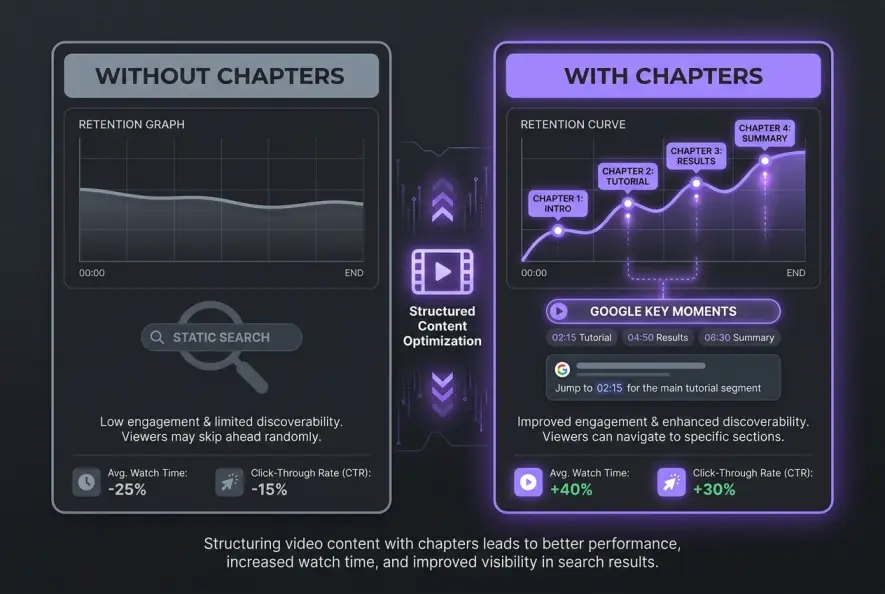
Google search data reveals that long-form videos structured with clear, interactive video chapters experience up to a 20% higher click-through rate in organic search results compared to unformatted uploads. When search engines can parse the exact structure of your video, they display specific clips directly inside Google search results as Key Moments and featured video snippets.
Adding youtube video timestamps requires placing formatted time codes in your video description starting at 00:00, creating at least three distinct chapters that are each a minimum of 10 seconds long, and labeling each segment with descriptive, keyword-rich titles. This simple formatting step transforms a long-form upload into an indexed, skippable resource that improves viewer retention and expands search visibility across both YouTube and Google search engines.
Why YouTube Timestamps Matter for SEO and Retention
Viewer behavior on modern video platforms has fundamentally shifted. People rarely watch a 20-minute tutorial linearly from start to finish. They want immediate answers to specific questions.
Without clear navigation, a viewer who reaches an irrelevant section will simply hit the back button. That sudden drop-off signals to YouTube’s recommendation system that your video failed to satisfy viewer intent.
Video chapters fix this retention leak by providing visual markers on the scrubber bar. Instead of abandoning the video entirely, viewers skip directly to the exact subtopic they need, staying on your watch page longer.
This is why your 15-minute tutorial gets initial clicks but fails to build sustained session watch time.
From a technical indexing standpoint, structured timestamps act as mini-sitemaps for search engines. Google’s crawling bots cannot "watch" your MP4 file line by line, but they easily read the text markers in your description. When a user searches for a specific long-tail problem, Google can surface the exact timestamp segment of your video as a direct answer.
| Video Metric | Unchaptered Video | Chaptered Video |
|---|---|---|
| Google Search Appearance | Standard video thumbnail | Interactive "Key Moments" clips |
| Audience Retention | High early drop-off from scrubbing | High session retention via targeted jumping |
| Search Keyword Indexing | Ranks only for main video title | Ranks for main title + individual chapter titles |
| User Experience (UX) | High frustration, higher bounce rate | High utility, higher bookmark/share rate |
Always write chapter titles around specific search queries viewers actually type into Google, rather than vague or artistic phrases like "The Secret."
The 4 Technical Rules YouTube Demands for Chapters
YouTube’s automated system parses descriptions looking for a very specific timestamp syntax. If your description misses even one requirement, the interactive chapter bar will fail to display on the video player.
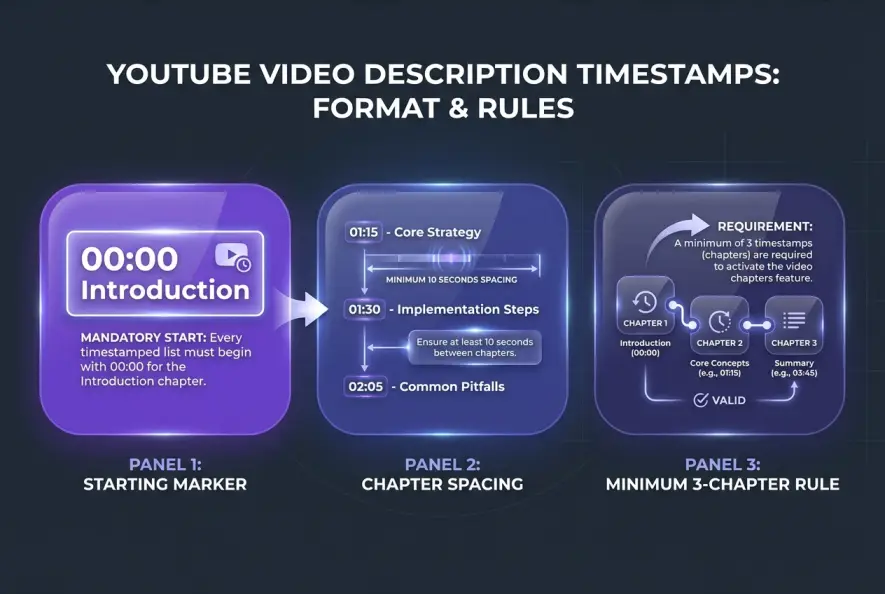
When properly structuring youtube video timestamps, you must follow four strict criteria:
- The Mandatory First Timestamp: The very first listed timecode must start precisely at
00:00(or0:00). Starting at00:01or skipping the intro timecode completely breaks the chapter parser. - Minimum Chapter Count: You must list a minimum of three timestamps in chronological order. A description with only two timecodes will not activate chapters.
- Minimum Segment Duration: Each chapter must be at least 10 seconds long. YouTube ignores chapter breaks placed 3 or 5 seconds apart.
- Formatting Consistency: Use standard time formatting (
MM:SSfor videos under an hour, orHH:MM:SSfor long-form content) separated from the title by a hyphen or space.
Here is an example of valid vs invalid timestamp syntax:
VALID FORMAT:
00:00 - Introduction & Overview
01:45 - Choosing the Right Equipment
05:30 - Setting Up Lighting & Audio
11:10 - Final Export Settings

INVALID FORMAT (Will not render chapters):
00:05 - Intro (Failed: Does not start at 00:00)
01:45 - Equipment
(Failed: Only 2 chapters listed instead of 3)
Starting your timestamps at 00:01 or leaving less than 10 seconds between chapter markers will silently prevent YouTube's automated parser from generating interactive player chapters.
Step-by-Step Guide to Adding Timestamps in YouTube Studio
Applying chapters to new uploads or legacy videos is simple and can be done entirely within YouTube Studio.
Step 1: Open Your Video Details Page
Log into YouTube Studio, select Content from the left navigation menu, and click the pencil icon next to the video you wish to edit.
Step 2: Navigate to the Description Field
Scroll to the main description box. You can place your timestamp list anywhere in the description, but placing it immediately below your main intro paragraph or link section delivers the best user experience.
Step 3: Map Out Your Chapter Markers
Watch your video edit to note down key section changes, or scan your spoken script.
When mapping out chapters on long-form tutorials or podcasts, rewatching hours of footage to find natural transition points consumes massive time. Pulling the video's full text transcript using Creators Grid's transcript extractor lets you scan the exact spoken words and pinpoint transition timestamps in seconds without scrubbing through the timeline.
Step 4: Write Your Timecodes and Titles
Type out your list starting with 00:00, ensuring every entry is on its own line. Ensure your chapter titles clearly describe what happens in that segment.
Step 5: Save and Verify
Click Save in the top-right corner of YouTube Studio. Open your video's public watch page in an incognito browser tab and verify that the scrubber bar displays distinct visual segments with hover titles.
Strategic Chapter Naming for Google Key Moments
Formatting your timestamps correctly is only half the battle. To maximize search reach, you must optimize the text labels attached to each timecode.
When Google indexes a video for search, it treats each chapter title as a micro-headline. If a user searches Google for "how to set up studio lighting," Google looks for a video chapter with that exact phrase or close semantic intent.
Follow these guidelines when naming your video chapters:
- Target Search Intent: Write labels that mirror real search questions. Instead of naming a section "My Gear," name it "Best Camera Settings for Beginners."
- Keep Titles Concise: Aim for 2 to 5 words per chapter title. Long titles get truncated on mobile screens and scrubber bar popups.
- Front-Load Keywords: Place the core topic noun near the start of the chapter label.
Optimizing your youtube video timestamps for keyword intent helps Google parse individual video segments as standalone answers, effectively giving one video multiple chances to rank on page one of Google.
For broader strategies on organizing your description metadata alongside timestamps, read our YouTube description SEO guide. Additionally, if you plan to repurpose your video content across other social channels, clean timestamps serve as the perfect blueprint for a broader content repurposing system.
Why Your Video Chapters Aren't Showing Up (Troubleshooting)
If you followed the syntax rules perfectly but video chapters still refuse to appear on your watch page, your channel or video may be running into one of YouTube's algorithmic restrictions:
- Active Copyright Strikes: Channels with active Community Guidelines strikes or copyright strikes often have automatic chapter privileges temporarily suspended by YouTube.
- Channel Eligibility: Brand-new channels without established trust history sometimes experience a delay before YouTube enables interactive scrubber chapters.
- Inappropriate Content: Videos containing flagged language, violent topics, or age-restricted material are ineligible for automatic chapter indexing.
- Automatic Chapters Conflict: If you enabled Automatic Chapters in YouTube Studio, it can occasionally conflict with manual description timestamps. Ensure manual description timestamps are saved cleanly, as manual entries override auto-generated ones.
According to Google's Video SEO documentation, ensuring high-quality metadata formatting directly improves your eligibility for rich video snippets across Google Search. For further technical details on platform features, review the official YouTube Creator support docs.
Conclusion
Adding timestamps to your YouTube videos is one of the simplest, highest-leverage optimizations you can make to your channel. By spending three minutes formatting timecodes in your video description, you boost viewer retention, reduce bounce rates, and unlock direct indexing in Google Search Key Moments. Audit your recent top-performing videos today, add structured chapter markers, and watch your search visibility expand.
Creators Grid Team
Empowering creators.
Actionable insights, strategies, and tools for the next generation of digital creators.
Frequently Asked Questions
YouTube requires a minimum of three timestamps listed in chronological order in your video description for chapters to display on the video player.
YouTube's automated description parser specifically looks for '00:00' as the starting trigger. If your first timestamp starts at 00:01 or later, chapters will fail to generate.
Each individual chapter must be at least 10 seconds long. Chapters shorter than 10 seconds are skipped by YouTube's player system.
Yes. Google indexes formatted timestamps as 'Key Moments' in search results, allowing searchers to click directly into specific sections of your video directly from Google search.
Yes. You can edit the description of any previously published video in YouTube Studio, add your timecodes, and YouTube will parse and display chapters within a few hours.
Automatic chapters are generated by YouTube's AI based on audio transcripts, while manual timestamps are written directly into the description by the creator. Manual timestamps are more accurate and always override automatic chapters.