YouTube Description SEO: The 2026 Guide to Ranking Higher

Creators Grid Team
August 13, 2026
YouTube processes over 500 hours of video content uploaded every single minute. Yet, according to search indexing data across video platforms, YouTube's search algorithm evaluates the first 200 characters of a video's written text field to determine its core topic before serving it to initial search test audiences.

To master YouTube description SEO, you must structure your text into distinct functional layers: a keyword-rich two-sentence summary at the top, a bulleted timestamp index, structured resource links, and grounded topic context. YouTube's semantic search model reads your description to index your video for intent-based searches, making structured metadata a primary driver for evergreen video discovery.
This is why two videos on the exact same topic can experience drastically different search lifespans based purely on how their text fields are formatted.
When most creators upload a video, they treat the description field as an afterthought—pasting a brief title summary, a handful of affiliate links, or worse, a random block of unstructured keywords. However, YouTube's search and recommendation engines operate as a sophisticated text-processing system. While the video visual provides engagement metrics like watch time and retention, the text metadata tells search engines who should see the video in the first place.
In 2026, natural language processing (NLP) algorithms analyze the relationships between phrases, entities, and search intent within your description. Optimizing this space requires a strategic approach that balances algorithm readability with human engagement.
The first 150–200 characters of your YouTube description appear directly in search results and above the 'Show More' fold on mobile devices. Treat this opening section like a meta description by incorporating your primary target query in the very first sentence.
The 3-Tier Architecture of a High-Ranking Description
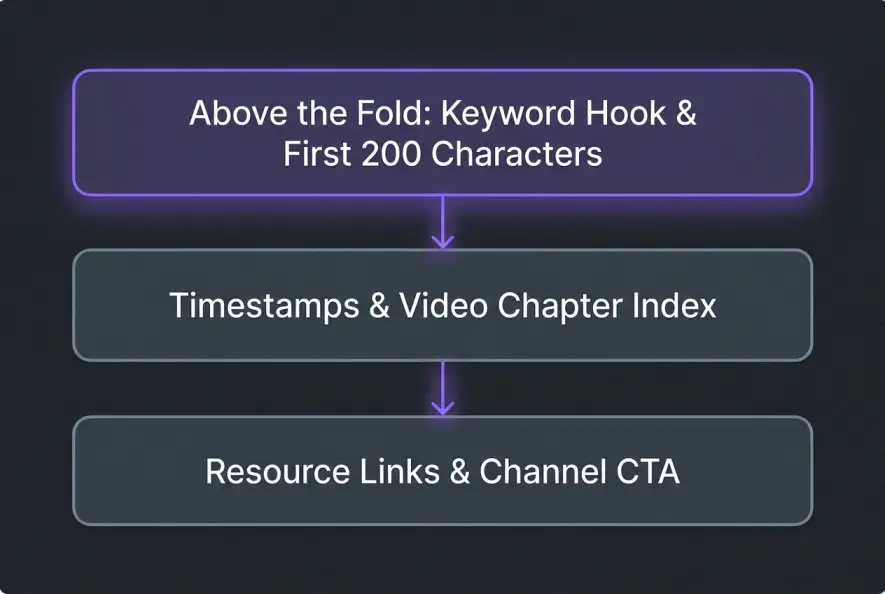
A high-ranking YouTube description shouldn't look like an unformatted wall of text. Algorithmic crawlers and human viewers both benefit from a clear, modular architecture divided into three distinct functional tiers.
Tier 1: Above the Fold (The First 200 Characters)
This is the most critical real estate in your entire video metadata package. Before a viewer clicks "Show More," they only see the first two lines of text. Search crawlers give maximum weight to words placed in this initial window.
- Primary Goal: Hook the searcher's interest and establish immediate query relevance.
- Tactical Execution: Front-load your core search phrase within the first 10 to 15 words. State exactly what problem the video solves or what specific question it answers.
- Tone Check: Write naturally for human readers. Avoid robotic phrases like "In this video we will discuss..." and instead use clear intent statements.
While your video description handles search discovery, your title and visual thumbnail handle the initial click — if your click-through rate is lagging behind your search impressions, revisit why your YouTube thumbnails are quietly killing your CTR to fix the visual side of your discovery funnel.
Tier 2: The Core Body (Timestamps & Extended Context)
The middle section of your description serves as an index for search engines and a navigation menu for viewers. This is where you expand on secondary search phrases, related concepts, and structural markers.
Adding clickable timestamps (e.g., 01:45) automatically creates video chapters on YouTube. These chapters are indexed by Google Search, allowing your video to appear as key moment snippets directly on web search results pages.
Tier 3: Below the Fold (Resources, Attribution & Socials)
The bottom section of your description is reserved for channel links, secondary resources, tools, credit attribution, and standard channel disclaimers. Because search engines weigh text near the bottom of a field less heavily, keeping administrative links down here prevents them from diluting your core topic keywords.
Structuring your metadata according to this three-tier layout ensures that primary search signals remain prominent, directly influencing your YouTube description SEO performance when search crawlers index your video.
Keyword Placement vs. Search Spam: What YouTube Punishes
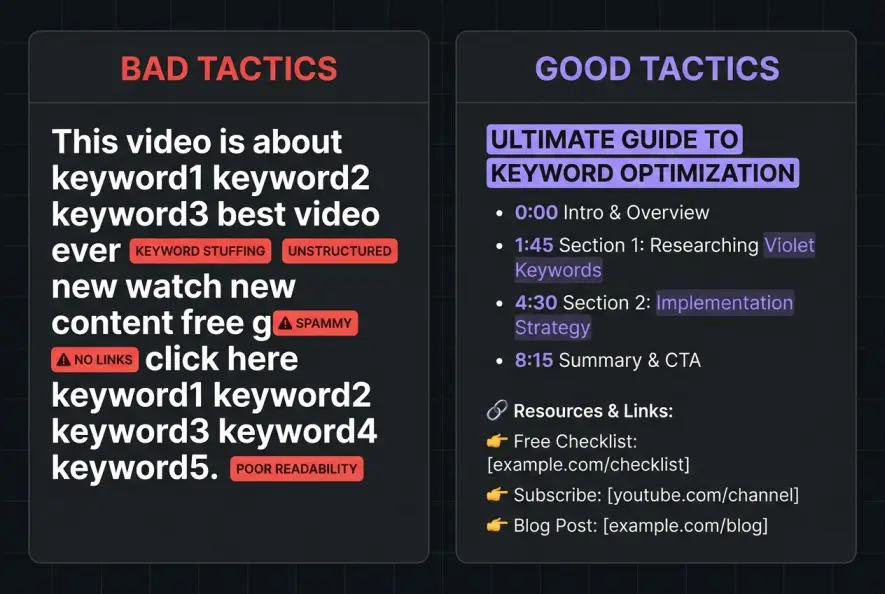
There is a massive difference between strategic keyword placement and search spam. In the early days of video optimization, creators frequently pasted blocks of 50 comma-separated keywords at the bottom of their descriptions to trick search engines. Modern search algorithms penalize this tactic aggressively.
According to official YouTube Creator Documentation, pasting excessive, unstructured tags or keyword lists into the description field violates platform guidelines against search spam and misleading metadata. When detected, videos risk reach suppression or outright removal.
| Metadata Strategy Aspect | Outdated Keyword Stuffing | Modern Semantic SEO |
|---|---|---|
| Keyword Placement | Isolated lists at the bottom of the description | Integrated naturally into full sentences and chapters |
| Search Engine Signal | Flagged as repetitive metadata spam | Read as natural topic context and query relevance |
| User Experience | Cluttered, unreadable block of text | Clean, scannable format with clear chapters |
| Algorithmic Safety | High risk of reach suppression or warnings | Fully compliant with platform search guidelines |
| Google SERP Impact | Ineligible for rich search snippets | Generates indexed Key Moments on Google Search |
Instead of repeating the exact same target phrase six times in a single paragraph, focus on natural semantic variations. Use synonym sets, long-tail variations, and related sub-topics that naturally support your main focus.
Never paste a wall of isolated keywords or comma-separated tags at the bottom of your text field. YouTube explicitly classifies tag-stuffed descriptions as search spam, which leads to reduced impressions or video flagging.
For instance, if your primary phrase is "budget camera setup," natural semantic variations include "affordable filming gear," "low-cost video equipment," and "entry-level YouTube camera." This gives search algorithms a broader semantic understanding of your content without triggering spam detectors.
Leveraging Timestamps for Google SERP Snippets
Timestamps are one of the most underutilized search tools available to creators. When you add correctly formatted timestamps to your description, YouTube automatically divides your video bar into chapters and feeds this structural data directly to Google's primary search index.
To ensure your timestamps trigger automated video chapters and search snippets, follow these exact formatting rules:
- Start at Zero: The first timestamp must always start at
00:00or0:00. - Minimum Length: Include at least three timestamps listed in chronological order, with each chapter lasting at least 10 seconds.
- Descriptive Labels: Label each timestamp with a short, keyword-relevant title (e.g.,
02:15 - How to Choose the Right Lens).
When Google indexes these chapters, your video can win "Key Moments" features in regular web search results. A user searching on Google for a specific sub-topic can click directly into the exact second of your video where that answer begins.
Aligning your video metadata with a comprehensive video repurposing system helps maintain clear topic continuity across multiple content channels.
Furthermore, research published by video analytics platforms like vidIQ and SEO research teams at Backlinko shows that videos utilizing structured chapters experience higher average watch times because viewers can quickly navigate to the specific value they came for rather than abandoning the video entirely.
Maintaining clear, intent-focused chapter titles helps support clean YouTube description SEO without triggering search spam penalties.
The Description Optimization Workflow
Before publishing your next video, run your description through this straightforward optimization checklist to ensure every element is working for your channel's search visibility.
- Front-load primary target keywords in the first two sentences (within the first 200 characters)
- Add formatted timestamps starting at 00:00 to trigger Google Key Moments and YouTube video chapters
- Keep text scannable with clear section headers, bullet points, and clean spacing
- Avoid pasting comma-separated tag blocks that trigger automated search spam filters
Optimizing your video descriptions isn't about gaming the algorithm with hidden tricks; it is about providing complete clarity to both search crawlers and human viewers. By structuring your metadata thoughtfully, you turn every upload into a long-term search asset that continues to attract targeted views for months and years to come.
Creators Grid Team
Empowering creators.
Actionable insights, strategies, and tools for the next generation of digital creators.
Frequently Asked Questions
YouTube allows up to 5,000 characters in the description field. While you don't need to use all 5,000 characters, aiming for 200 to 400 well-structured words gives search algorithms enough textual context to accurately index your video.
No. YouTube officially states that video tags play a very minimal role in search ranking and are primarily used to catch common spelling errors. Your video title, description, and audience retention metrics carry far more weight in search rankings.
Yes. Updating an older video's description with clear timestamps, modern search terms, and a strong above-the-fold summary can trigger search crawlers to re-index the video, often leading to renewed search visibility.
Include 2 to 3 relevant hashtags in your description. The first three hashtags will appear near your video title. Avoid using more than 15 hashtags, as YouTube will ignore all hashtags on that video if overused.
Video chapters may fail to appear if your first timestamp doesn't start at 00:00, if you have fewer than three timestamps, if any chapter is under 10 seconds, or if your channel has active copyright strikes or low channel trust.