Instagram Keyword SEO: How to Rank on Explore and Search

Creators Grid Team
August 14, 2026
You write a detailed caption, add five targeted hashtags, and post high-resolution visual content—yet your profile traffic never grows outside your immediate follower base. Meanwhile, accounts in your exact niche show up consistently whenever users search broad industry terms in the app's top bar.

To capture consistent discovery traffic today, you must implement intentional instagram keyword seo across your entire profile profile structure, captions, and visual metadata. Instagram functions fundamentally as an intent-based search engine that indexes text signals, semantic topic clusters, and visual assets to serve hyper-relevant content directly to active searchers.
For years, discoverability advice revolved entirely around hashtag selection. While hashtags still serve a contextual sorting purpose, Instagram has shifted its ranking infrastructure toward comprehensive semantic search. If your profile and posts lack direct, structured text signals, you miss out on compounding organic discovery from users actively searching for solutions.
This shift directly determines whether your posts surface in search queries or stay buried behind optimized competitors.
How the Instagram Search Algorithm Indexes Content
When a user types a query into Instagram's search bar, the ranking system does not just match exact usernames. It parses accounts, audio, hashtags, and individual posts through an integrated natural language processing pipeline.
According to Instagram's official breakdown of search, the search engine relies on three core tiers of signals to determine what content surfaces in the top results:
- Text relevance: The query typed into the search bar is matched directly against display names, usernames, bios, captions, and hashtag labels.
- User activity: The system analyzes which topics, accounts, and post formats the searcher has engaged with recently to personalize result ordering.
- Popularity signals: For competitive search terms, the engine prioritizes posts and accounts demonstrating high click-through rates, rapid engagement, and frequent shares.
[User Search Query]
       │
       ▼
[Text Match: Name + Bio + Captions + Audio]
       │
       ▼
[Relevance & Semantic Intent Scoring]
       │
       ▼
[Personalization & Popularity Filters]
       │
       ▼
[Final Search & Explore Ranking]
Understanding this pipeline changes how you produce content. Instead of treating captions as casual commentary, you need to structure them as indexed landing documents designed to answer clear search intent.

Optimizing Your Profile Infrastructure for Search
Your profile's top-level metadata acts as your primary domain authority on Instagram. If your username and bio do not contain primary category terms, the algorithm struggles to classify your account's core niche.
The Display Name Formula
Your Name field is one of the heaviest-weighted text fields in the entire search index. Unlike your @handle, your Name can be changed without altering your account URL, and it is fully searchable.
Avoid repeating your brand name twice if your handle already covers it. Instead, structure your display name with this format:
[First Name / Brand] | [Primary Focus Keyword]
For example, instead of naming an account Alex Miller, use Alex Miller | Notion Templates. When someone searches for template resources, your account surfaces instantly even if they have never heard of your brand.
Strategic Bio Architecture
Your bio must convey clear topical relevance within its 150-character limit. Integrate primary and secondary search phrases directly into complete, readable sentences rather than packing disjointed keywords separated by vertical bars.
| Bio Component | Traditional Approach | Search-Optimized Approach |
|---|---|---|
| Display Name | Just Brand Name | Brand Name + Primary Keyword |
| Category Tag | Hidden / Generic | Exact Niche Alignment |
| Bio Body | Vague lifestyle quote | Clear value proposition with 2–3 niche keywords |
| Link In Bio | Generic home URL | Contextual resource anchor |
Do not sacrifice readability for raw keyword volume in your bio. Instagram's semantic parser prioritizes natural phrasing that accurately describes your account's actual output over repetitive keyword stuffing.
Optimizing your core profile ensures your account appears under high-intent user searches. If you also struggle with turning profile visits into long-term subscribers, examine our breakdown on why your Instagram Reels get views but no followers to close the conversion gap.
Structuring Captions for In-App Search Indexing
Your post caption serves as the primary text document that Instagram's AI scans to categorize your visual media. To rank reliably in explore tabs and search feeds, you must implement a structured instagram keyword seo writing workflow.
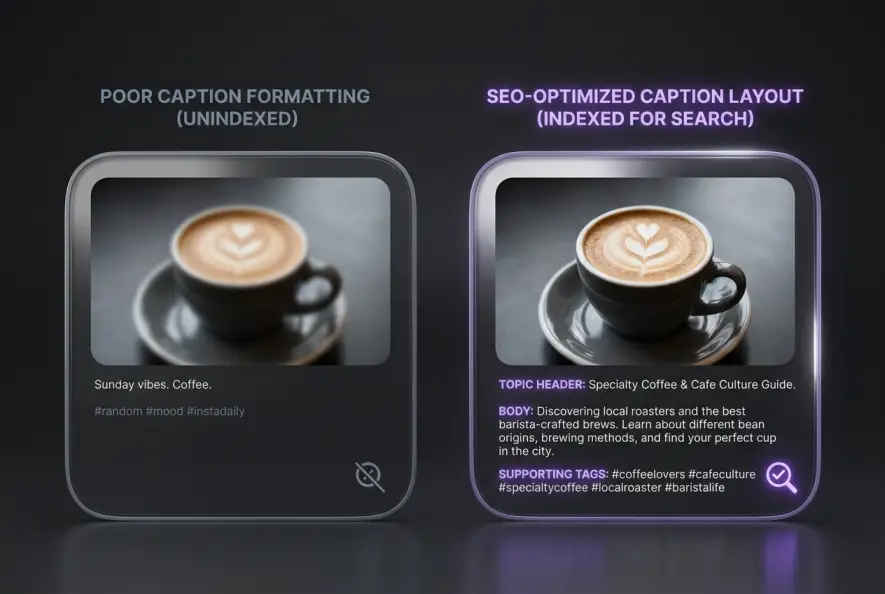
Writing one-sentence captions like "Monday mood ✨" or dumping 30 disconnected tags at the bottom gives the search parser zero topical context, relegating your post solely to follower feeds.
1. Front-Load the Core Topic in the Hook
The first two lines of your caption are prioritized by search spiders and feed parsers. State the primary problem, technique, or subject within the first 80 characters.
If your post explains video lighting, start with: "Setting up a two-point video lighting studio on a budget requires three specific adjustments..." rather than "Hey guys, check out my new studio setup!"
2. Build Semantic Depth in the Body Copy
Incorporate related sub-topics, synonyms, and natural conversational phrases throughout the caption. If your primary phrase is freelance design workflow, naturally weave in terms like client onboarding, Figma handoff, and design revisions.
This topical depth allows the algorithm to understand the broader context of your post and recommend it across adjacent search queries.
3. Use Supporting Tags Strategically
Hashtags remain useful as secondary categorization markers, but they should reinforce your caption text rather than replace it. Compare the trade-offs of tagging approaches in our analysis of manual hashtags vs generators to streamline your tagging workflow.
Visual Metadata and Alt Text Optimization
Instagram does not rely exclusively on written captions. The platform uses advanced computer vision to scan image contents and automatic speech recognition (ASR) to transcribe spoken words in Reels and video posts.
[Spoken Audio in Reel] ──► [Auto Speech-to-Text] ──┐
                                                   ▼
[Visual Image Scan]   ──► [Computer Vision AI]   ──► [Unified Context Index]
                                                   ▲
[Custom Alt Text]     ──► [Accessibility Layer]  ──┘
Configuring Custom Alt Text Correctly
Alt text was designed for visually impaired users relying on screen readers, but search engines also use it to confirm the contents of an image. You can manually adjust alt text in the Advanced Settings screen before publishing.
Write objective, descriptive descriptions that accurately reflect what appears on screen while incorporating your target search phrases naturally:
- Incorrect (Keyword Stuffed): "instagram keyword seo ranking growth reels algorithm discoverability tips"
- Correct (Descriptive & Natural): "Infographic displaying an Instagram profile dashboard highlighting where to place target keywords in the display name and bio."
Instagram automatically generates synthetic alt text using computer vision if you leave the field blank. Writing custom alt text ensures the system captures precise technical terms the automated vision model might misinterpret.
Spoken Audio Signals in Reels
Because Instagram transcribes spoken dialogue in Reels automatically, clearly pronouncing your topic's key terminology during the first five seconds of your video generates an immediate audio metadata match. Ensure your on-screen captions match your spoken dialogue precisely to reinforce indexing signals across multiple media layers.
Step-by-Step Keyword Research Workflow for Instagram
Finding high-intent search terms does not require enterprise SEO software. You can uncover powerful search phrases directly inside the Instagram mobile interface using a simple four-step process.
Step 1: Query Auto-Suggest Analysis
Tap the search icon and begin typing your broad niche term (e.g., "meal prep"). Note the recommended auto-complete phrases that drop down below the search bar. These represent high-volume queries actual users search for daily.
Step 2: Analyze the "For You" Search Tab
Tap into a top search result and inspect the top-ranking posts under that query. Note the recurring phrases appearing in their captions, display names, and on-screen text overlays.
Step 3: Map Semantic Keyword Clusters
Group your discovered terms into logical content buckets. Organize them into primary search terms, secondary technical sub-terms, and long-tail query questions.
- Display name and bio text establish your account's base topical authority.
- Front-load primary keywords in the first sentence of your post captions.
- Use descriptive, human-readable custom alt text for all visual assets.
- Speak your primary topic clearly in the opening seconds of video content.
By executing this structured instagram keyword seo approach across every asset you publish, you transform your profile from an ephemeral feed into a permanent, searchable discovery engine that drives qualified engagement for months after posting.
Creators Grid Team
Empowering creators.
Actionable insights, strategies, and tools for the next generation of digital creators.
Frequently Asked Questions
Instagram begins indexing text and audio signals within minutes of publishing. However, ranking in competitive search tabs alongside high-engagement posts typically requires initial engagement velocity during the first 2 to 6 hours.
Always place primary keywords directly in the main caption. Instagram's search parser prioritizes caption body copy, display names, and alt text over comments when determining search relevance.
Editing a caption to fix typos or refine keyword phrasing does not reset your post's indexing. However, drastically rewriting the text to target an entirely different topic can cause temporary ranking fluctuations while the algorithm re-evaluates relevance.
If you paste identical blocks of stuffed keywords across dozens of posts, the spam detection filter may dampen your reach. Instead, naturally vary your phrasing by using semantic synonyms and context-specific sub-topics.
Yes. Instagram scans on-screen text stickers and automated closed captions using optical character recognition (OCR), incorporating those visual words directly into the post's semantic search profile.